

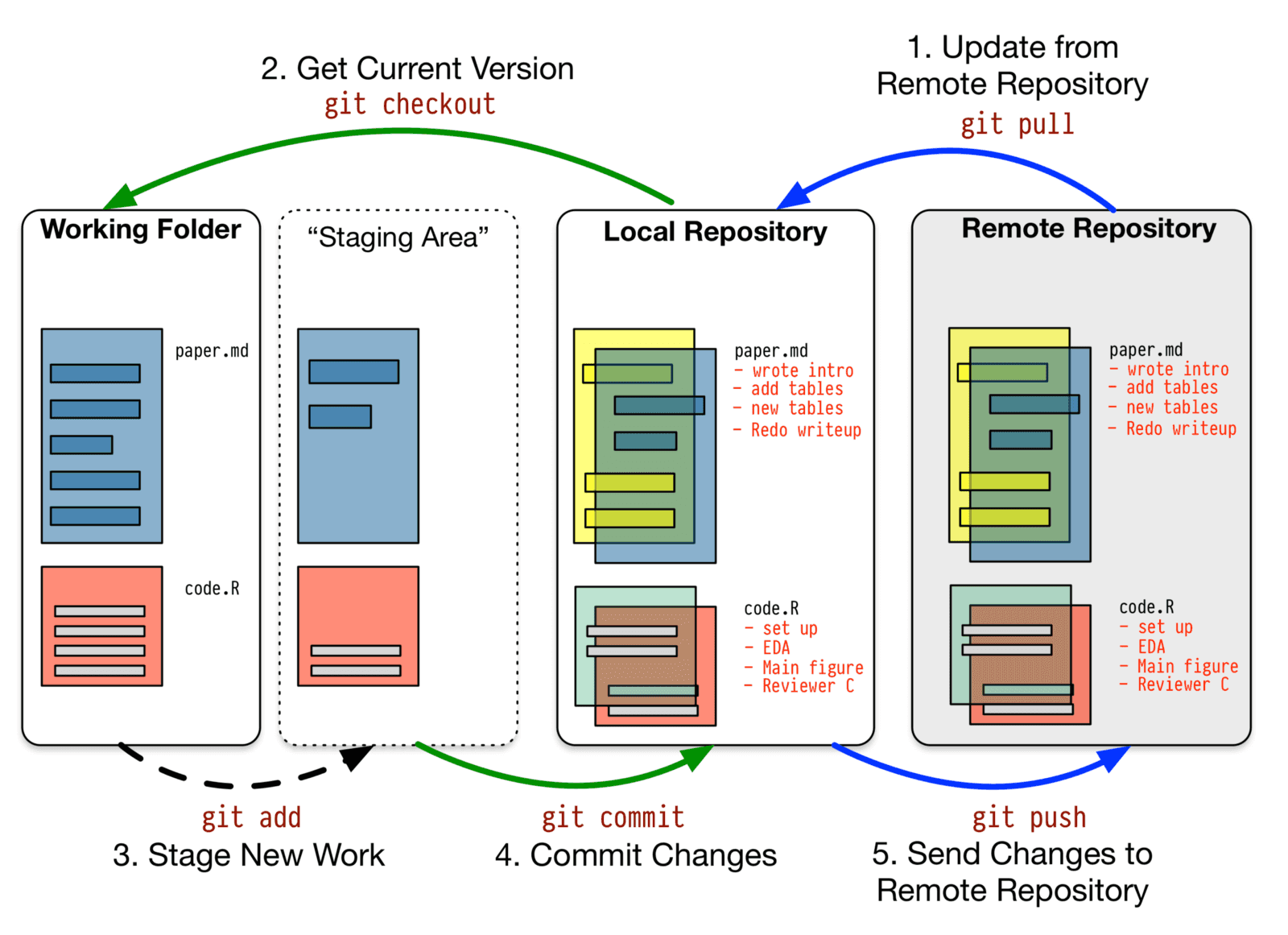
John is a budding software developer excited about building usable products. He develops and hosts applications using cheap hosting services. After a few months of diving into software development, he felt it was time to get a job to put into practise what he has learnt and also work in a team.
During an interview with one of the well-known firms he applied to, he was given a task to work on. One of the requirements for being successful was to have an understanding of working with git. Poor John who has been working alone was not aware of the usefulness of version control in software development. He has been hearing about the concept but does not fully understand how it works.
Guess what! He lost the opportunity because he was actually expected to push the code to a git repository when he is done with the coding task assigned to him but was not told. So, he just finished and left. A few minutes later, the interviewer called him and asked - "Hi John, hope you pushed your code to git?"
He felt very bad losing that opportunity as a result of not understanding that version control is an integral part of software engineering.
If you are like John, this article is for you. Let's dive right in.
What is version control?
A system that records changes to a file or set of files over time so that you can recall specific versions later
We have Centralized Version Control Systems where a single server contains all the versioned files, and a number of clients that check out files from that central place and Distributed Version Control Systems in which every clone is really a full backup of all the data.
The second option is widely used. The popular GitHub, Gitlab and Bitbucket use this method.
Git is a version control system for tracking changes in computer files and coordinating work on those files among multiple people. It is primarily used for source code management in software development, but it can be used to keep track of changes in any set of files.
"It worked yesterday but not working today. Someone must have accidentally introduced a bug and I can't seem to figure out who. I'm finding it difficult getting it back to its previous state. Argh!"
When working in a team, the above scenario is bound to happen and Git is at the rescue. All versions of the code are recorded for reference purposes.
Git Workflow
Master Branch: This is a replica of the code in production. No one is allowed to code directly on this branch.
Release Branch: This is created from the master branch. This becomes necessary when multiple projects are running on the same code base e.g. when paying your technical debts by trying to get rid of legacy code. To work on a feature, you need to create another branch from this branch.
Feature Branch: For every feature added, there should be a feature branch. This ensures parallel developments making rollbacks and cherrypicking easier.
Steps
Open your terminal
Verify if git is installed
git --versionSet a git username globally
git config --global user.name "your_user_name"Set a git email globally
git config --global user.email "your_email"Confirm that you have set your git details correctly
git config --global user.name

git config --global user.email
Initialize git in your project
mkdir project-name

cd project-name

git init
or Start with a remote repository
git clone repository_URLCreate a new branch for the aspect of the project you want to work on and change the current working directory to your new branch
git checkout -b name_of_your_new_branchor Switch to an existing branch
git checkout name_of_the_branchCreate README file
echo "# repository_name" >> README.mdAdd specific file
git add filename.extensionor Add all changes
git add .Check the current state of your branch
git statusCommit changes
git commit -m "commit_message"If the task is associated with a ticket number, use the ticket number as a prefix to the commit message e.g.
git commit -m "Feature-add-filters"View your current remote repository
git remote show originAdd a new remote for your branch:
git remote add name_of_your_remote remote_URL

e.g. git remote add origin https://github.com/username/project-name.git
Change your remote URL
git remote set-url origin remote_URLPush changes from your branch to the remote repository
git push -u name_of_your_remote name_of_your_branch- Pushing to master
git push -u origin master- Pushing to a given remote branch. If the remote branch do not exist, it would be created
git push -u origin feature_branch_nameIf the task is associated with a ticket number, use the ticket number as the feature branch name e.g.
git push origin -u feature-filtersTo push the current branch and set the remote as upstream:
git push --set-upstream origin name_of_your_new_remote

e.g. git push --set-upstream origin master
View differences in branches
git diff name_of_the_source_branch name_of_the_target_branchUpdate your branch when the original branch from the official repository has been updated
git fetch name_of_your_remoteor
git pull origin name_of_your_new_remoteMerge changes from master to your branch:
git checkout your_branch_name

git merge master
Merge changes from your branch to the master branch:
git checkout master

git merge your_branch_name
Fetch updates from a forked repository
cd the_forked_repo

git remote add upstream forked_repo_URL

git pull upstream master
Unstage a file
git reset HEAD filename.extensionView all your branches:
git branchTo rename a local branch,
- If you are on the branch:
git branch -m new_name- If you are on another branch:
git branch -m current_name new_branch_nameTo rename a remote branch, delete the current branch and push the new one:
git push origin :current_branch_name

git push origin -u new_branch_name
To deploy selected features
git cherrypick commit_hashView git logs
git log --summary

git log --graph
View your git configurations
git config --list --show-originDelete a directory from Git AND local
git rm -r directory_nameDelete a directory from Git BUT NOT LOCAL
git rm -r --cached directory_nameDelete a file from Git AND local
git rm filename.extensionDelete a file from Git BUT NOT LOCAL
git rm --cached filename.extensionForcefully Delete a staged file
git rm -f filename.extensionDelete a branch on your local file system
git branch -d name_of_your_branchDelete the branch on Github
git push origin :name_of_your_branchTo view contributions by each member of your team,
git shortlog -sn --all --no-mergesThe shortlog provides summaries of git log; the -s flag will suppress commit description and shows a commit count summary, the -n flag will sort the output according to the number of commits per author. The --all flag logs all branches, and --no-merges ensures that merge commits are not counted.
To get all your commits to a remote branch on the working tree of your local machine,
git reset --soft origin/masterTo correct a wrong name or email used to make a push to a project,
$ git filter-branch --env-filter '
WRONG_EMAIL="old-email@example.com"
NEW_NAME="New Name"
NEW_EMAIL="new-email@example.com"

if [ "$GIT_COMMITTER_EMAIL" = "$WRONG_EMAIL" ]
then
    export GIT_COMMITTER_NAME="$NEW_NAME"
    export GIT_COMMITTER_EMAIL="$NEW_EMAIL"
fi
if [ "$GIT_AUTHOR_EMAIL" = "$WRONG_EMAIL" ]
then
    export GIT_AUTHOR_NAME="$NEW_NAME"
    export GIT_AUTHOR_EMAIL="$NEW_EMAIL"
fi
' --tag-name-filter cat -- --branches --tags
To update a branch and its dependencies
git rebase BRANCH_NAME --update-refsTo push updates of branches to a remote repository
git push --force-with-lease origin BRANCH_1 BRANCH_NVersion Control Tools
Some tools make it possible for us to avoid the hassle of writing these commands by abstracting its complexities.
-
GitLens extension for VS Code
-
Source tree (for Mac and Windows)
-
VCS menu option on IntelliJ IDEs (PHP Storm, Android Studio, etc.)
As a software developer, it is advisable to use the command line. Learn how to configure your terminal with ZSH for maximum output.